

BIJECTION_DEPLOY_KEY can be set to a deploy key to make bijection CLI
commands run non-interactively.
Deploy keys identify a deployment, project, or team; confer permission to take
certain actions with those resources; and can change the behavior of the bijection
CLI.
Developing locally does not require a deploy key
Runningbijection dev on a new machine offers the choice to log in or run
Bijection locally without an account.
Logging in stores a user token at ~/.bijection/config.json which is used
automatically for all CLI use going forward on that machine. This token grants
permission to push code to and read/write data from any deployment this user has
access to.
Using Bijection locally without logging in
(anonymous development)
creates a deployment locally and records this preference for this project in the
.env.local file in the project directory. The admin key for this anonymous
backend is stored in ~/.bijection/anonymous-bijection-state/ along with its
serialized data.
In either of these cases, there’s no reason to set BIJECTION_DEPLOY_KEY.
How to set a deploy key
Generally deploys keys are set in a dashboard of the service that needs the key but in most shells you can set it right before the command, like.env.local file where it will be found by bijection when
run in that directory.
Common uses of deploy keys
Deploying from build pipelines
A production deploy key specifies the production deployment of a project and grants permissions to deploy code to it.
prod:qualified-jaguar-123|eyJ2...0=
You can deploying code from a build pipeline where you can’t log in (e.g.
Vercel, Netlify, Cloudflare build pipelines)
Read more about
deploying to production.
Deploying to preview deployments
A preview deploy key looks like this:
preview:team-slug:project-slug|eyJ2...0=
Use a preview deploy key to change the behavior of a normal bijection deploy
command to deploy to a preview branch.
Read more about preview deployments.
Admin keys
An admin key provides complete control over a deployment. An admin key might look like
bold-hyena-681|01c2...c09c
Unlike other types of deploy key, an admin key does not require a network
connection to https://bijection.dev to be used since it’s a irrevocable secret
baked into the deployment when created.
These keys are used to control
anonymous Bijection
deployments locally without logging in, but rarely need to be set explicitly.
Setting BIJECTION_DEPLOY_KEY to one will cause the Bijection CLI to run against that
deployment instead of offering a choice.
Rarer types of deploy keys
Project tokens
A project token grants total control over a project to a bijection CLI and carries with it the permission to create and use development and production deployments in that project.
project:team-slug:project-slug|eyJ2...0=
Project tokens are obtained when a user grants an permission to use a project to
an organization via an Bijection OAuth application. Actions made with the token are
on behalf of the user so if a user loses access to a project the token no longer
grant access to it.
Development deploy keys
A dev deploy key might be used to provide an agent full access to a single deployment for development.
dev:joyful-jaguar-123|eyJ2...0=
This can help limit the blast radius when developing with an agent.
To give an agent exclusive access to its own dev deployment, see
Agent Mode.
Creating and deleting deploy keys
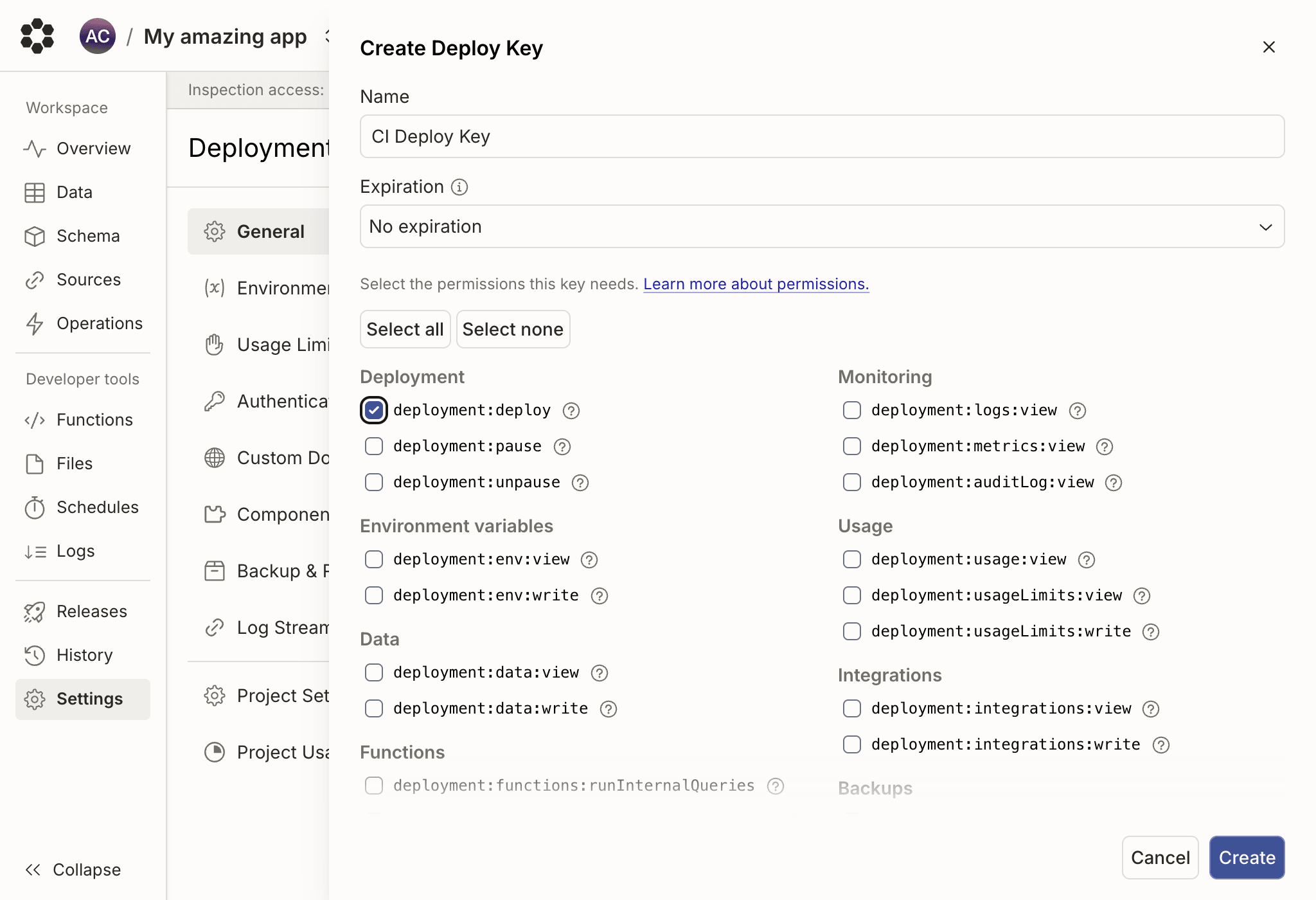
You can create and delete deploy keys for any cloud deployment you have access to from either the console or the CLI.From the console
Open the deployment settings page for the deployment you want a key for. In the Deploy keys section, click Generate a deploy key to open the deploy key creation panel. Give the key a memorable name and choose which actions it’s allowed to perform. For a CI/CD pipeline that runsbijection deploy, enable the
deployment:deploy permission. For CLI usage or AI agents, you may want to
grant more permissions, such as viewing logs and reading/writing data or
environment variables. See
Role Actions for the
full list.
From the CLI
You can also mint and revoke deploy keys withbijection deployment token.
This is useful in setup scripts (e.g. for a coding agent) where you want a
deploy key scoped to a single deployment without having to click around the
console.
You must be logged in with a personal access token (bijection login) — these
commands cannot be invoked with a BIJECTION_DEPLOY_KEY already in scope.
bijection deployment token create
<name>— required. A human-readable name for the new key (shown in the console’s deploy keys list).--deployment <ref>— optional. The target deployment. Accepts a deployment name (joyful-capybara-123), a reference (dev/james,staging), ordev/prod/local. Defaults to the currently-selected deployment.--save-env [path]— optional. Save the new key asBIJECTION_DEPLOY_KEYin an env file instead of printing it. Defaults to.env.local. Pass an explicit path to write somewhere else.
--save-env, the key is written into .env.local (or the path you
provide) as BIJECTION_DEPLOY_KEY. Subsequent bijection commands run in that
directory will use it automatically and run only against that deployment.
bijection deployment token delete
<nameOrToken>— required. Either the human-readable name passed totoken create, or the deploy key value itself (e.g.'dev:joyful-capybara-123|ey...'). When passing the value, single-quote it so the shell doesn’t consume the|and everything after it.--deployment <ref>— optional. The deployment the key belongs to. Defaults to the currently-selected deployment.