> ## Documentation Index
> Fetch the complete documentation index at: https://docs.bijection.com/llms.txt
> Use this file to discover all available pages before exploring further.
# Exception Reporting
> Configure exception reporting integrations for your Bijection deployment
Configure exception reporting to gain visibility into errors from your Bijection
function executions. Bijection supports integration with
[Sentry](https://sentry.io/),
[PostHog Error Tracking](https://posthog.com/docs/error-tracking), and
[Datadog Error Tracking](https://www.datadoghq.com/product/error-tracking/).
## Configuring Sentry
To configure sentry, navigate to the
[Deployment Settings](/dashboard/deployments/settings) in the console, and
the "Integrations" tab in the sidebar.
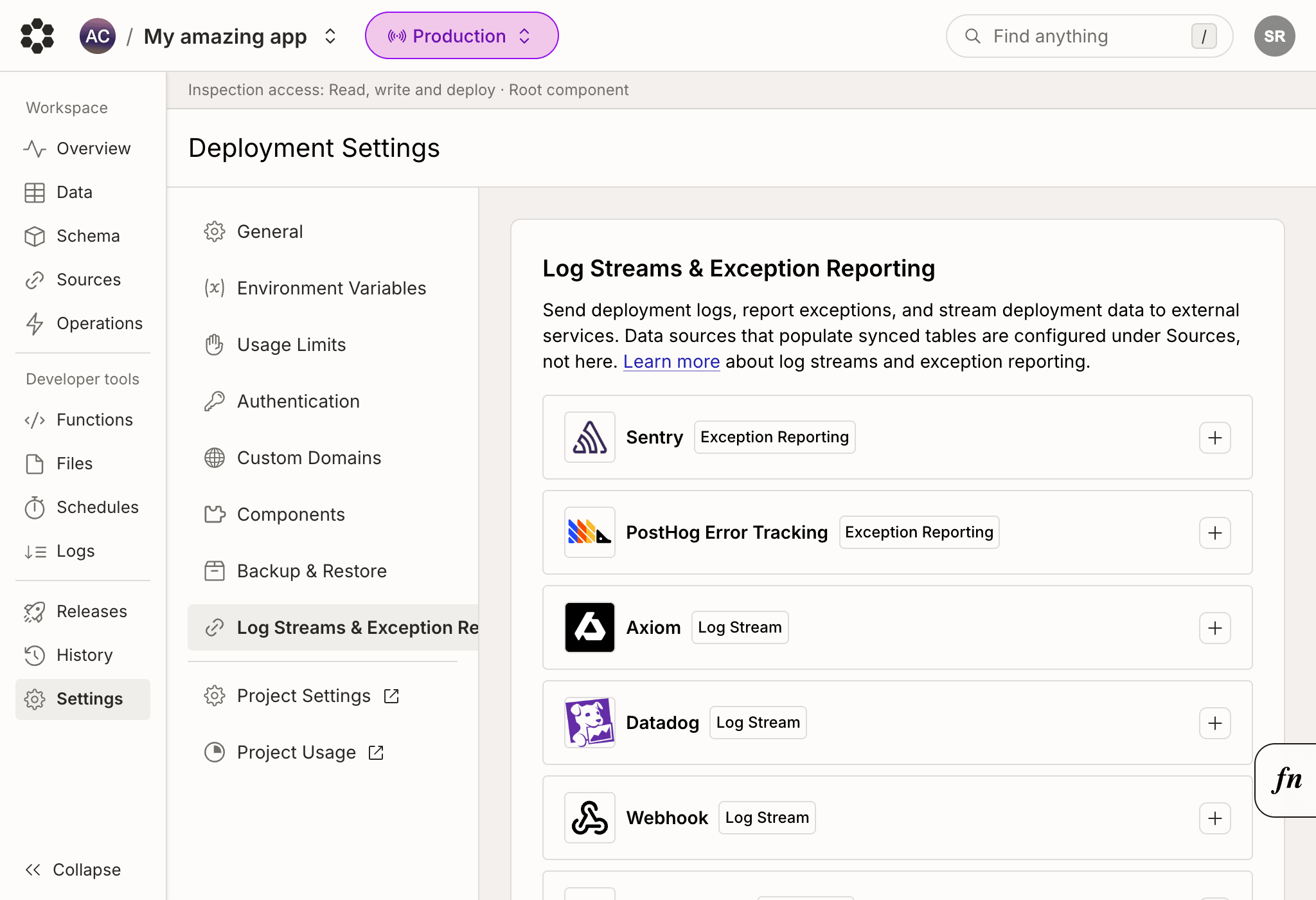 Click on the Sentry card and follow the setup directions. You will need your
[Sentry DSN](https://docs.sentry.io/product/sentry-basics/concepts/dsn-explainer/).
You may optionally specify additional tags to be added to each exception event.
When creating your project in Sentry, mark its platform as **Node.js** so that
exception events are processed correctly.
## Supported Tags
Bijection automatically tags exception events on their way to sentry with the
following tags. These tags cannot be overridden.
* `func`: The name of the running function in
[string format](/functions/query-functions#query-names)
* `func_type`: One of `["query", "mutation", "action", "http_action"]`
* `func_runtime`: One of the [function runtimes](/functions/runtimes) -
`["default", "node"]`
* `request_id`: The
[request id](/functions/debugging#finding-relevant-logs-by-request-id) of
the function that errored.
* `server_name`: The name of the deployment. e.g. `happy-animal-123`
* `environment`: One of `["prod", "dev", "preview"]`
* `user`: If the function is [authenticated](/auth/overview), then the
[tokenIdentifier](/api/interfaces/server.UserIdentity#tokenidentifier) is used
as the user id on Sentry. The `tokenIdentifier` is a stable and globally
unique string representing the authenticated user.
## Sentry Notes
* Sentry Exceptions may take a minute or two to propagate to Sentry.
* Bijection's built-in sentry support does not yet support the advanced
customization provided by the sentry SDK.
* Please reach out with any questions, comments, or suggestions
at [hello@bijection.com](mailto:hello@bijection.com).
## Configuring PostHog Error Tracking
To configure PostHog Error Tracking, navigate to the
[Deployment Settings](/dashboard/deployments/settings) in the console, and
the "Integrations" tab in the sidebar.
Click on the PostHog Error Tracking card and follow the setup directions. You
will need your [PostHog project token](https://us.posthog.com/settings/project),
found in PostHog under Settings > Project > General.
You may optionally specify a custom host URL. Defaults to US Cloud
(`https://us.i.posthog.com`). Use `https://eu.i.posthog.com` for EU Cloud, or
your self-hosted URL. The endpoint path is added automatically.
### Supported Properties
Bijection automatically includes the following properties on each `$exception`
event sent to PostHog:
* `bijection_function`: The name of the running function in
[string format](/functions/query-functions#query-names)
* `bijection_function_type`: One of
`["query", "mutation", "action", "http_action"]`
* `bijection_function_runtime`: One of the
[function runtimes](/functions/runtimes) - `["default", "node"]`
* `bijection_deployment`: The name of the deployment, e.g. `happy-animal-123`
* `bijection_deployment_type`: One of `["prod", "dev", "preview"]`
* `bijection_request_id`: The
[request ID](/functions/debugging#finding-relevant-logs-by-request-id) of
the function that errored
* `distinct_id`: If the function is [authenticated](/auth/overview), the
[tokenIdentifier](/api/interfaces/server.UserIdentity#tokenidentifier) is
used. Otherwise, the deployment name is used as a fallback.
### PostHog Error Tracking Notes
* Exceptions may take a minute or two to appear in PostHog.
* Stack traces from your Bijection functions are included automatically.
## Configuring Datadog Error Tracking
Follow the instructions in the
[Datadog application](https://app.datadoghq.com/error-tracking/settings/setup/sentry)
to configure Datadog error tracking via the Sentry SDK. Then use the
Bijection-Sentry integration to proceed.
Click on the Sentry card and follow the setup directions. You will need your
[Sentry DSN](https://docs.sentry.io/product/sentry-basics/concepts/dsn-explainer/).
You may optionally specify additional tags to be added to each exception event.
When creating your project in Sentry, mark its platform as **Node.js** so that
exception events are processed correctly.
## Supported Tags
Bijection automatically tags exception events on their way to sentry with the
following tags. These tags cannot be overridden.
* `func`: The name of the running function in
[string format](/functions/query-functions#query-names)
* `func_type`: One of `["query", "mutation", "action", "http_action"]`
* `func_runtime`: One of the [function runtimes](/functions/runtimes) -
`["default", "node"]`
* `request_id`: The
[request id](/functions/debugging#finding-relevant-logs-by-request-id) of
the function that errored.
* `server_name`: The name of the deployment. e.g. `happy-animal-123`
* `environment`: One of `["prod", "dev", "preview"]`
* `user`: If the function is [authenticated](/auth/overview), then the
[tokenIdentifier](/api/interfaces/server.UserIdentity#tokenidentifier) is used
as the user id on Sentry. The `tokenIdentifier` is a stable and globally
unique string representing the authenticated user.
## Sentry Notes
* Sentry Exceptions may take a minute or two to propagate to Sentry.
* Bijection's built-in sentry support does not yet support the advanced
customization provided by the sentry SDK.
* Please reach out with any questions, comments, or suggestions
at [hello@bijection.com](mailto:hello@bijection.com).
## Configuring PostHog Error Tracking
To configure PostHog Error Tracking, navigate to the
[Deployment Settings](/dashboard/deployments/settings) in the console, and
the "Integrations" tab in the sidebar.
Click on the PostHog Error Tracking card and follow the setup directions. You
will need your [PostHog project token](https://us.posthog.com/settings/project),
found in PostHog under Settings > Project > General.
You may optionally specify a custom host URL. Defaults to US Cloud
(`https://us.i.posthog.com`). Use `https://eu.i.posthog.com` for EU Cloud, or
your self-hosted URL. The endpoint path is added automatically.
### Supported Properties
Bijection automatically includes the following properties on each `$exception`
event sent to PostHog:
* `bijection_function`: The name of the running function in
[string format](/functions/query-functions#query-names)
* `bijection_function_type`: One of
`["query", "mutation", "action", "http_action"]`
* `bijection_function_runtime`: One of the
[function runtimes](/functions/runtimes) - `["default", "node"]`
* `bijection_deployment`: The name of the deployment, e.g. `happy-animal-123`
* `bijection_deployment_type`: One of `["prod", "dev", "preview"]`
* `bijection_request_id`: The
[request ID](/functions/debugging#finding-relevant-logs-by-request-id) of
the function that errored
* `distinct_id`: If the function is [authenticated](/auth/overview), the
[tokenIdentifier](/api/interfaces/server.UserIdentity#tokenidentifier) is
used. Otherwise, the deployment name is used as a fallback.
### PostHog Error Tracking Notes
* Exceptions may take a minute or two to appear in PostHog.
* Stack traces from your Bijection functions are included automatically.
## Configuring Datadog Error Tracking
Follow the instructions in the
[Datadog application](https://app.datadoghq.com/error-tracking/settings/setup/sentry)
to configure Datadog error tracking via the Sentry SDK. Then use the
Bijection-Sentry integration to proceed.