> ## Documentation Index
> Fetch the complete documentation index at: https://docs.bijection.com/llms.txt
> Use this file to discover all available pages before exploring further.
# Environment Variables
> Declare, store, and access environment variables in Bijection
Environment variables are key-value pairs that are useful for storing values you
wouldn't want to put in code or in a table, such as an API key. You can set
environment variables in Bijection through the console and access them in
[functions](/functions/overview).
For the best experience, [declare your environment variables](#declaring-environment-variables) in
`bijection/bijection.config.ts` to get type-safe access via the generated `env`
object. You can also access any environment variable via `process.env`.
## Setting environment variables
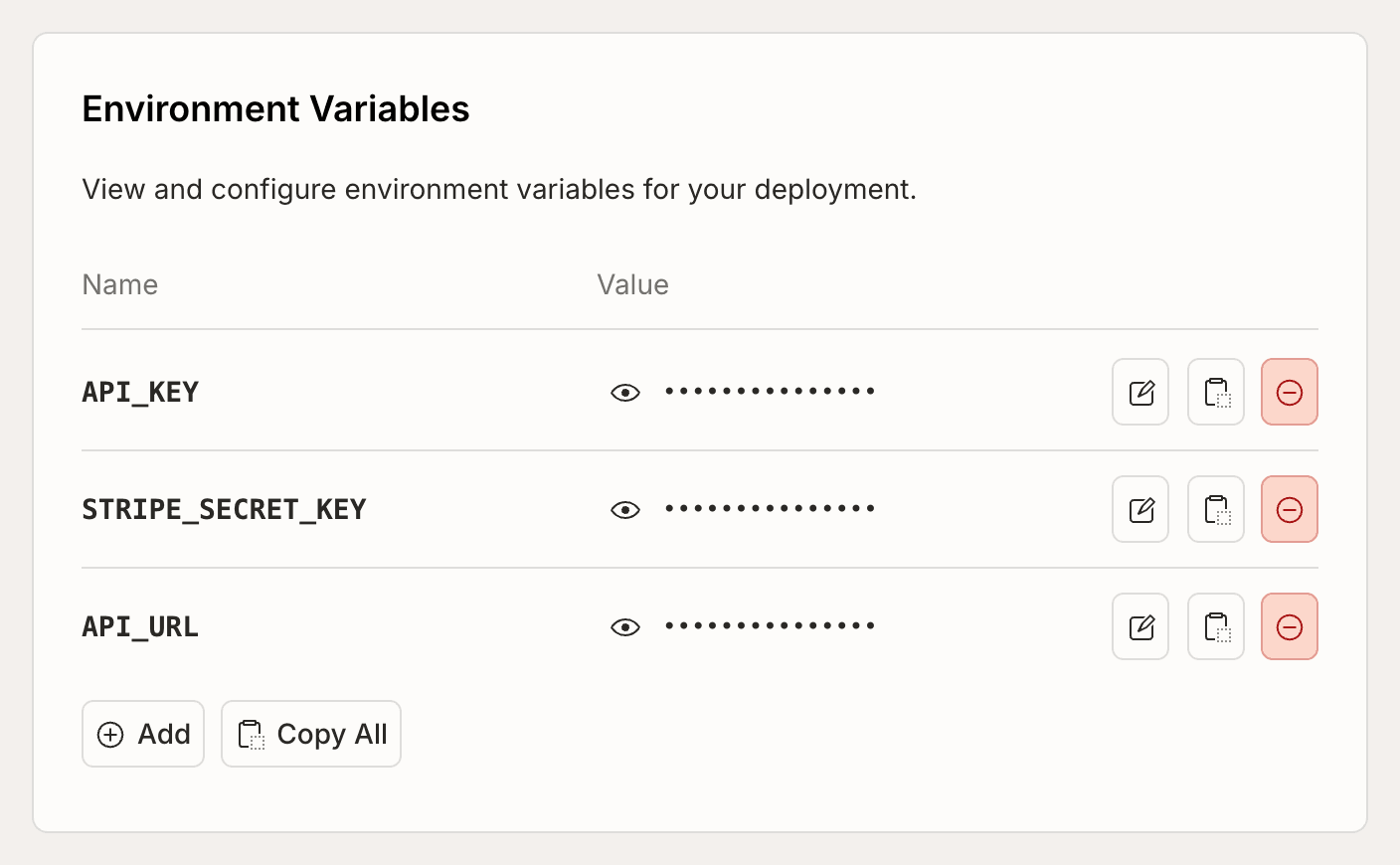
Under [Deployment Settings](/dashboard/deployments/settings) in the
console, you can see a list of environment variables in the current
deployment.
 You can add up to 512 environment variables, and the total size of all
environment variables (names + values) cannot exceed 512KiB. Environment
variable names cannot be more than 256 characters long, and they must start with
a letter and only contain letters, numbers, and underscores. Environment
variable values cannot be larger than 8KiB.
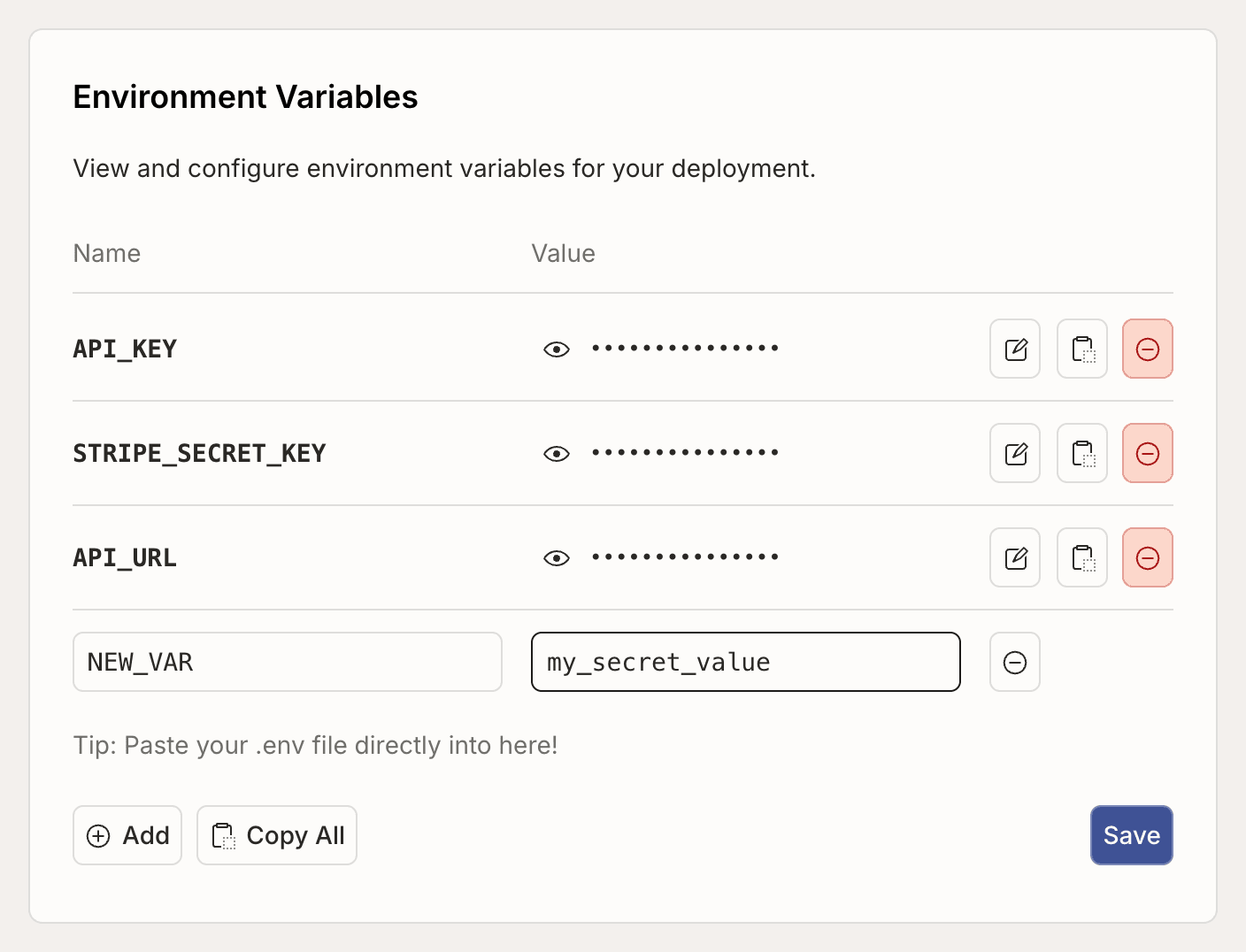
You can modify environment variables using the pencil icon button:
You can add up to 512 environment variables, and the total size of all
environment variables (names + values) cannot exceed 512KiB. Environment
variable names cannot be more than 256 characters long, and they must start with
a letter and only contain letters, numbers, and underscores. Environment
variable values cannot be larger than 8KiB.
You can modify environment variables using the pencil icon button:
 Environment variables can also be viewed and modified from the
[command line](/cli/reference/env).
```sh theme={"theme":{"light":"github-light-default","dark":"github-dark-default"}}
bijection env list
bijection env get NAME
bijection env set NAME 'value'
bijection env set --from-file .env.bijection
bijection env remove NAME
```
### Using environment variables in dev and prod deployments
Since environment variables are set per-deployment, you can use different values
for the same key in dev and prod deployments. This can be useful for when you
have different external accounts you'd like to use depending on the environment.
For example, you might have a dev and prod SendGrid account for sending emails,
and your function expects an environment variable called `SENDGRID_API_KEY` that
should work in both environments.
If you expect an environment variable to be always present in a function, you
must add it to **all** your deployments. In this example, you would add an
environment variable with the name `SENDGRID_API_KEY` to your dev and prod
deployments, with a different value for dev and prod.
## Declaring environment variables
You can declare the environment variables your app expects in
`bijection/bijection.config.ts`. Declared environment variables give you type-safe
access, validation at deploy time, and clear documentation of what your app
needs to run. This also helps prevent removing required environment variables or
setting them to invalid values from the console or
`bijection env [remove|set] ...`.
```ts bijection/bijection.config.ts theme={"theme":{"light":"github-light-default","dark":"github-dark-default"}}
import { defineApp } from "bijection/server";
import { v } from "bijection/values";
const app = defineApp({
env: {
GIPHY_KEY: v.string(),
LOG_LEVEL: v.optional(
v.union(v.literal("debug"), v.literal("info"), v.literal("error")),
),
},
});
export default app;
```
The `env` option maps variable names to validators from `bijection/values`. The
supported validators are:
* `v.string()` — any string value
* `v.literal("value")` — an exact string value
* `v.union(v.literal("a"), v.literal("b"))` — one of several exact values
* `v.optional(...)` — wraps any of the above to mark a variable as optional
After running `bijection dev`, Bijection generates a typed `env` object that you
import from `_generated/server`:
```ts bijection/myFunction.ts theme={"theme":{"light":"github-light-default","dark":"github-dark-default"}}
import { query, env } from "./_generated/server";
export const gifUrl = query({
args: {},
handler: async () => {
// env.GIPHY_KEY is typed as `string`
// env.LOG_LEVEL is typed as `"debug" | "info" | "error" | undefined`
return (
"https://api.giphy.com/v1/gifs/translate?api_key=" +
env.GIPHY_KEY +
"&s=cats"
);
},
});
```
The `env` import works in queries, mutations, actions, and HTTP actions.
TypeScript will catch typos and type mismatches at build time rather than at
runtime.
You still need to [set the actual values](#setting-environment-variables) in the
console or CLI — declaring them in `bijection.config.ts` defines what's expected,
not what the values are.
Declaring environment variables is optional. If you don't declare them, you can
still access all environment variables via `process.env` as described
[below](#accessing-environment-variables-via-process-env), just without any guarantees about what
value they contain.
### Passing environment variables to components
[Components](/components/overview) are isolated from the app's environment
variables. When a component declares environment variables in its
`bijection.config.ts`, you can provide environment variables when installing it:
```ts bijection/bijection.config.ts theme={"theme":{"light":"github-light-default","dark":"github-dark-default"}}
import { defineApp } from "bijection/server";
import { v } from "bijection/values";
import myComponent from "@example/my-component/bijection.config";
const app = defineApp({
env: {
LOG_LEVEL: v.union(
v.literal("debug"),
v.literal("info"),
v.literal("error"),
),
},
});
// Pass by reference — the component's LOG_SEVERITY will always
// match this app's LOG_LEVEL - even when it changes between deploys.
app.use(myComponent, { env: { LOG_SEVERITY: app.env.LOG_LEVEL } });
export default app;
```
You can also populate component environment variables via literal values:
```ts bijection/bijection.config.ts theme={"theme":{"light":"github-light-default","dark":"github-dark-default"}}
// Pass a literal value
app.use(myComponent, { env: { LOG_SEVERITY: "debug" } });
```
See
[Authoring Components: Environment Variables](/components/authoring#environment-variables)
for how to declare environment variables in a component.
## Accessing environment variables via `process.env`
You can access environment variables in Bijection functions using
`process.env.KEY`. If the variable is set it is a `string`, otherwise it is
`undefined`. Here is an example of accessing an environment variable with the
key `GIPHY_KEY`:
```javascript theme={"theme":{"light":"github-light-default","dark":"github-dark-default"}}
function giphyUrl(query) {
return (
"https://api.giphy.com/v1/gifs/translate?api_key=" +
process.env.GIPHY_KEY +
"&s=" +
encodeURIComponent(query)
);
}
```
If you've [declared your environment variables](#declaring-environment-variables) in
`bijection.config.ts`, prefer using the typed `env` import from `_generated/server`
instead of `process.env` for better type safety. You can use the
[`@bijection/no-process-env`](/eslint#no-process-env) ESLint rule to
automatically flag `process.env` reads, and suggest using `env.*` instead.
Note that you should not condition your Bijection function exports on environment
variables. The set of Bijection functions that can be called is determined during
deployment and is not reevaluated when you change an environment variable. The
following code will throw an error at runtime, if the DEBUG environment variable
changes between deployment and calling the function.
```javascript theme={"theme":{"light":"github-light-default","dark":"github-dark-default"}}
// THIS WILL NOT WORK!
export const myFunc = process.env.DEBUG ? mutation(...) : internalMutation(...);
```
Similarly, environment variables used in cron definitions will only be
reevaluated on deployment.
## System environment variables
The following environment variables are always available in Bijection functions:
* `BIJECTION_CLOUD_URL` - Your deployment URL (eg.
`https://dusty-nightingale-847.bijection.cloud`) for use with Bijection clients.
* `BIJECTION_SITE_URL` - Your deployment site URL (eg.
`https://dusty-nightingale-847.bijection.site`) for use with
[HTTP Actions](/functions/http-actions)
## Project environment variable defaults
You can set up default environment variable values for a project in Project
Settings.
Environment variables can also be viewed and modified from the
[command line](/cli/reference/env).
```sh theme={"theme":{"light":"github-light-default","dark":"github-dark-default"}}
bijection env list
bijection env get NAME
bijection env set NAME 'value'
bijection env set --from-file .env.bijection
bijection env remove NAME
```
### Using environment variables in dev and prod deployments
Since environment variables are set per-deployment, you can use different values
for the same key in dev and prod deployments. This can be useful for when you
have different external accounts you'd like to use depending on the environment.
For example, you might have a dev and prod SendGrid account for sending emails,
and your function expects an environment variable called `SENDGRID_API_KEY` that
should work in both environments.
If you expect an environment variable to be always present in a function, you
must add it to **all** your deployments. In this example, you would add an
environment variable with the name `SENDGRID_API_KEY` to your dev and prod
deployments, with a different value for dev and prod.
## Declaring environment variables
You can declare the environment variables your app expects in
`bijection/bijection.config.ts`. Declared environment variables give you type-safe
access, validation at deploy time, and clear documentation of what your app
needs to run. This also helps prevent removing required environment variables or
setting them to invalid values from the console or
`bijection env [remove|set] ...`.
```ts bijection/bijection.config.ts theme={"theme":{"light":"github-light-default","dark":"github-dark-default"}}
import { defineApp } from "bijection/server";
import { v } from "bijection/values";
const app = defineApp({
env: {
GIPHY_KEY: v.string(),
LOG_LEVEL: v.optional(
v.union(v.literal("debug"), v.literal("info"), v.literal("error")),
),
},
});
export default app;
```
The `env` option maps variable names to validators from `bijection/values`. The
supported validators are:
* `v.string()` — any string value
* `v.literal("value")` — an exact string value
* `v.union(v.literal("a"), v.literal("b"))` — one of several exact values
* `v.optional(...)` — wraps any of the above to mark a variable as optional
After running `bijection dev`, Bijection generates a typed `env` object that you
import from `_generated/server`:
```ts bijection/myFunction.ts theme={"theme":{"light":"github-light-default","dark":"github-dark-default"}}
import { query, env } from "./_generated/server";
export const gifUrl = query({
args: {},
handler: async () => {
// env.GIPHY_KEY is typed as `string`
// env.LOG_LEVEL is typed as `"debug" | "info" | "error" | undefined`
return (
"https://api.giphy.com/v1/gifs/translate?api_key=" +
env.GIPHY_KEY +
"&s=cats"
);
},
});
```
The `env` import works in queries, mutations, actions, and HTTP actions.
TypeScript will catch typos and type mismatches at build time rather than at
runtime.
You still need to [set the actual values](#setting-environment-variables) in the
console or CLI — declaring them in `bijection.config.ts` defines what's expected,
not what the values are.
Declaring environment variables is optional. If you don't declare them, you can
still access all environment variables via `process.env` as described
[below](#accessing-environment-variables-via-process-env), just without any guarantees about what
value they contain.
### Passing environment variables to components
[Components](/components/overview) are isolated from the app's environment
variables. When a component declares environment variables in its
`bijection.config.ts`, you can provide environment variables when installing it:
```ts bijection/bijection.config.ts theme={"theme":{"light":"github-light-default","dark":"github-dark-default"}}
import { defineApp } from "bijection/server";
import { v } from "bijection/values";
import myComponent from "@example/my-component/bijection.config";
const app = defineApp({
env: {
LOG_LEVEL: v.union(
v.literal("debug"),
v.literal("info"),
v.literal("error"),
),
},
});
// Pass by reference — the component's LOG_SEVERITY will always
// match this app's LOG_LEVEL - even when it changes between deploys.
app.use(myComponent, { env: { LOG_SEVERITY: app.env.LOG_LEVEL } });
export default app;
```
You can also populate component environment variables via literal values:
```ts bijection/bijection.config.ts theme={"theme":{"light":"github-light-default","dark":"github-dark-default"}}
// Pass a literal value
app.use(myComponent, { env: { LOG_SEVERITY: "debug" } });
```
See
[Authoring Components: Environment Variables](/components/authoring#environment-variables)
for how to declare environment variables in a component.
## Accessing environment variables via `process.env`
You can access environment variables in Bijection functions using
`process.env.KEY`. If the variable is set it is a `string`, otherwise it is
`undefined`. Here is an example of accessing an environment variable with the
key `GIPHY_KEY`:
```javascript theme={"theme":{"light":"github-light-default","dark":"github-dark-default"}}
function giphyUrl(query) {
return (
"https://api.giphy.com/v1/gifs/translate?api_key=" +
process.env.GIPHY_KEY +
"&s=" +
encodeURIComponent(query)
);
}
```
If you've [declared your environment variables](#declaring-environment-variables) in
`bijection.config.ts`, prefer using the typed `env` import from `_generated/server`
instead of `process.env` for better type safety. You can use the
[`@bijection/no-process-env`](/eslint#no-process-env) ESLint rule to
automatically flag `process.env` reads, and suggest using `env.*` instead.
Note that you should not condition your Bijection function exports on environment
variables. The set of Bijection functions that can be called is determined during
deployment and is not reevaluated when you change an environment variable. The
following code will throw an error at runtime, if the DEBUG environment variable
changes between deployment and calling the function.
```javascript theme={"theme":{"light":"github-light-default","dark":"github-dark-default"}}
// THIS WILL NOT WORK!
export const myFunc = process.env.DEBUG ? mutation(...) : internalMutation(...);
```
Similarly, environment variables used in cron definitions will only be
reevaluated on deployment.
## System environment variables
The following environment variables are always available in Bijection functions:
* `BIJECTION_CLOUD_URL` - Your deployment URL (eg.
`https://dusty-nightingale-847.bijection.cloud`) for use with Bijection clients.
* `BIJECTION_SITE_URL` - Your deployment site URL (eg.
`https://dusty-nightingale-847.bijection.site`) for use with
[HTTP Actions](/functions/http-actions)
## Project environment variable defaults
You can set up default environment variable values for a project in Project
Settings.
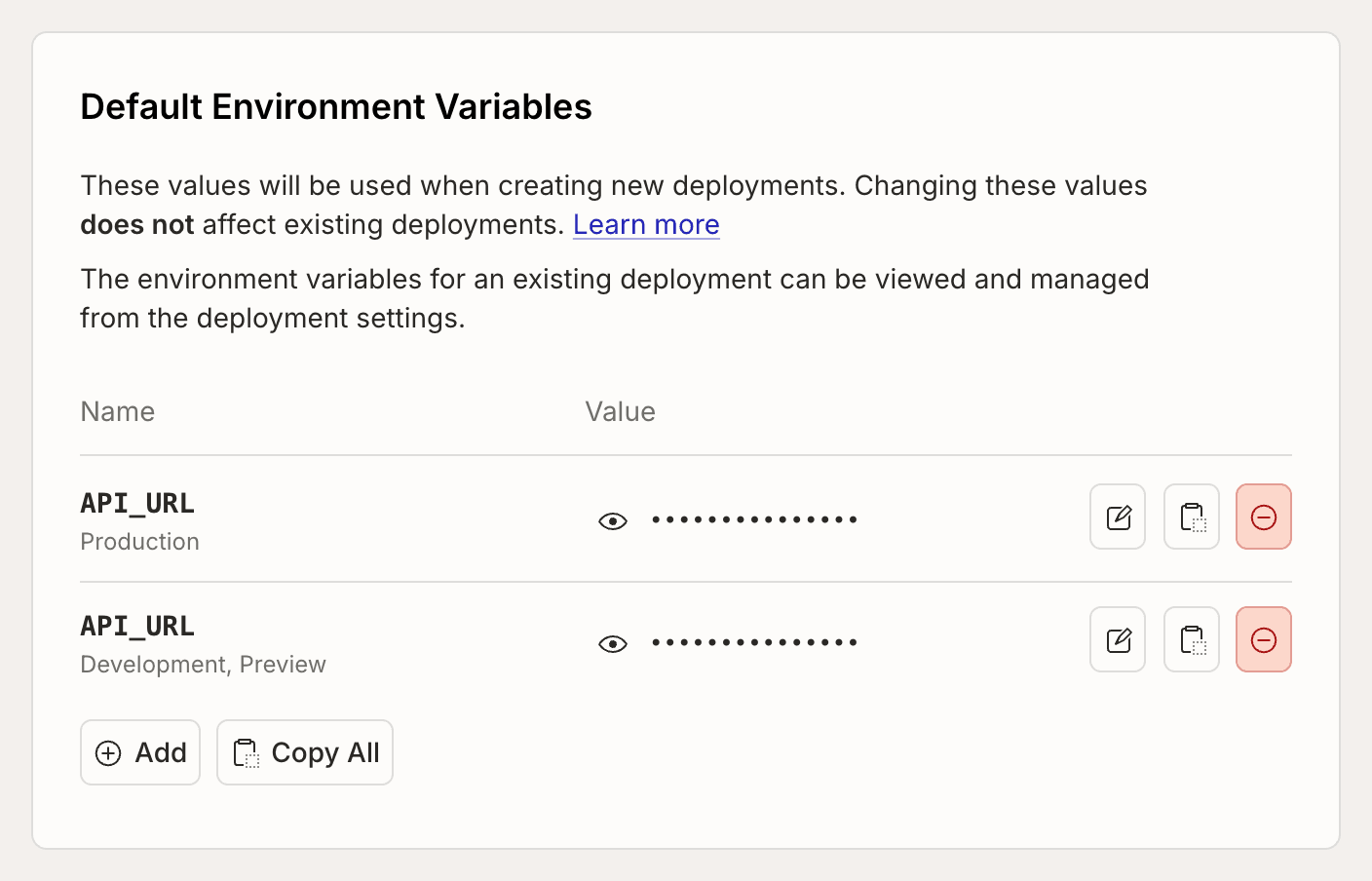 These default values will be used when creating a new deployment, and will have
no effect on existing deployments (they are not kept in sync). You can set a
different default value for each
[deployment type](/production/multiple-deployments#deployment-types).
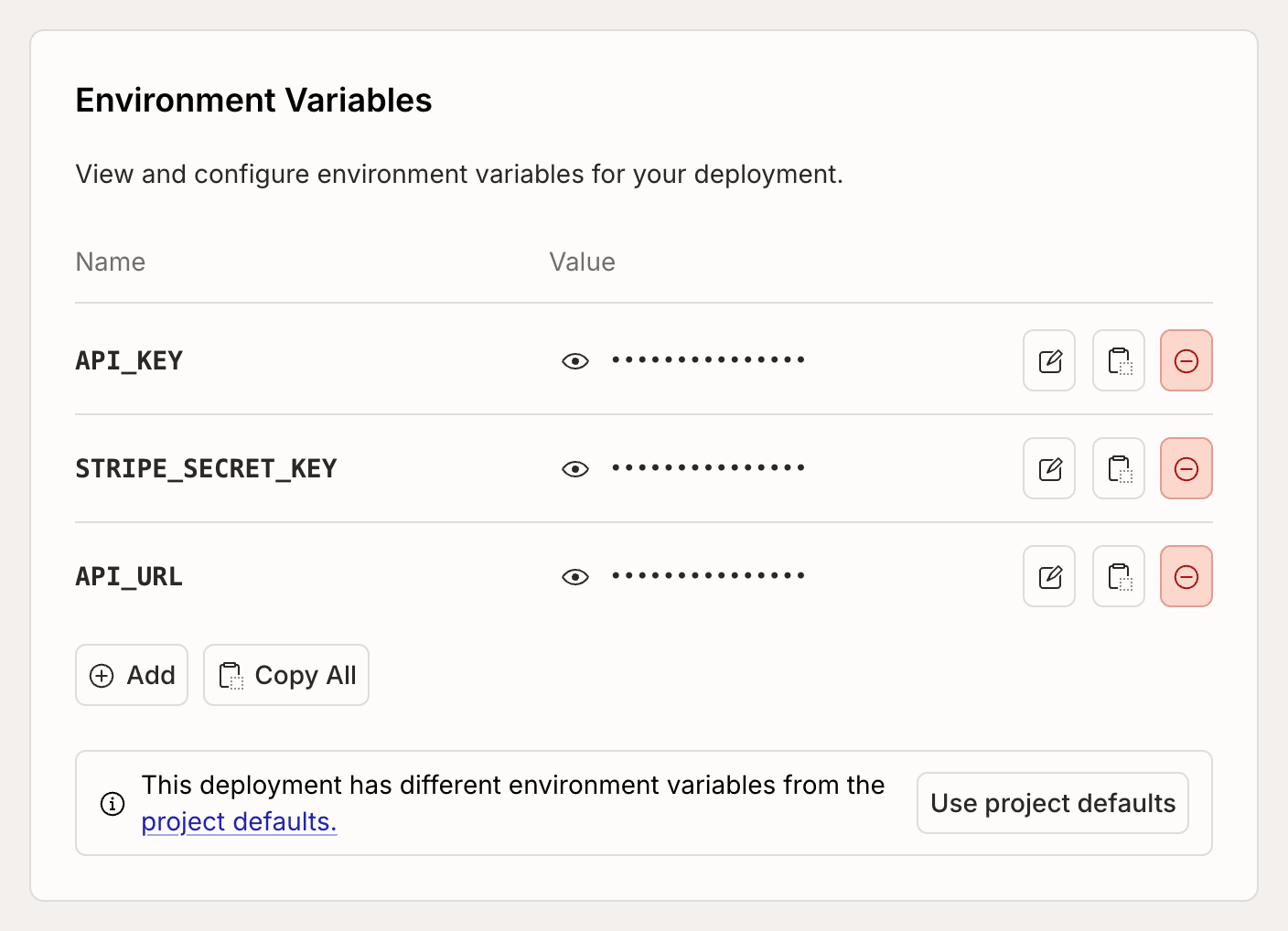
The Deployment Settings will indicate when a deployment has environment
variables that do not match the project defaults.
These default values will be used when creating a new deployment, and will have
no effect on existing deployments (they are not kept in sync). You can set a
different default value for each
[deployment type](/production/multiple-deployments#deployment-types).
The Deployment Settings will indicate when a deployment has environment
variables that do not match the project defaults.
 You can also change the default environment variables from the CLI using
`bijection env default`.
You can also change the default environment variables from the CLI using
`bijection env default`.