> ## Documentation Index
> Fetch the complete documentation index at: https://docs.bijection.com/llms.txt
> Use this file to discover all available pages before exploring further.
# Profile
> Manage your Bijection account name, email addresses, security settings, and account deletion
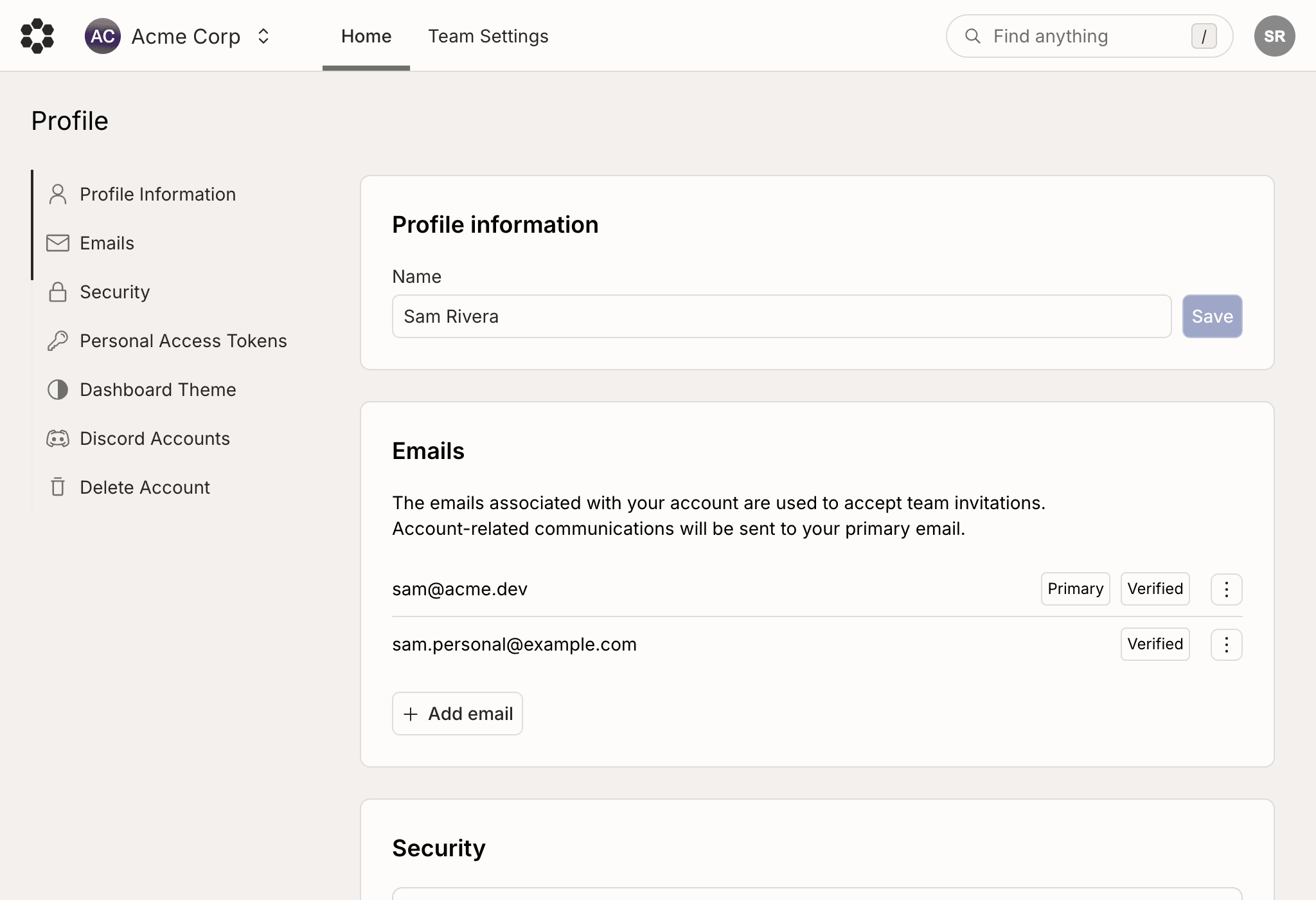
The [Profile page](https://console.bijection.com) is where you manage
your personal Bijection account, including your display name, the email addresses
associated with your account, your sign-in security settings, and account
deletion.
 ## Change your account name
Your account name is shown to other members of teams you belong to. Update it in
the **Profile information** section by editing the **Name** field and clicking
**Save**.
## Manage email addresses
The **Emails** section lists every email address connected to your account.
Account-related communications (such as invoices and security notifications) are
sent to your primary email, and any verified email may be used to accept team
invitations.
## Security
The **Security** section is where you manage how you sign in to your Bijection
account. It provides two things:
* **Password and multi-factor authentication (MFA)**: Set or change your
password and enroll additional authentication factors, such as an
authenticator app. Enabling MFA requires a valid factor each time you sign in.
* **Active sessions**: Review every session currently signed in to your account
and sign out of any of them, which is useful if you no longer have access to a
device or suspect unauthorized access.
You can only manage security settings while signed in with your
[primary email](#manage-email-addresses). If you're signed in with a secondary
email, sign out and sign back in with your primary email, or change which email
is primary, to reach these settings.
Once you enable multi-factor authentication, you can no longer sign in with
secondary email addresses.
## Personal access tokens
The **Personal Access Tokens** section manages the tokens used to authenticate
with the [Bijection CLI](/cli/overview) and APIs. Each token has the same
access as your account, so keep it secure and do not share it publicly.
To create a token, click **Create Token**, give it a name, and optionally choose
an expiration.
Each token in the list shows when it was created, when it was last used, and (if
set) when it expires. Tokens created through an SSO-based login are marked with
an **SSO Access** badge and are scoped to the associated team.
Click **Delete** next to a token to revoke it.
## Deleting your Bijection account
The **Delete Account** section at the bottom of the page permanently deletes
your Bijection account. Before you can delete your account, it must meet the
following requirements:
* You must not be the only admin in any team that has other members. Either
promote another member to admin or remove the other members. See
[Teams](/dashboard/teams/teams) for how to manage team members and roles.
* You must delete all projects in teams where you are the only member. See
[Projects](/dashboard/projects#deleting-a-project) for how to delete a
project.
## Change your account name
Your account name is shown to other members of teams you belong to. Update it in
the **Profile information** section by editing the **Name** field and clicking
**Save**.
## Manage email addresses
The **Emails** section lists every email address connected to your account.
Account-related communications (such as invoices and security notifications) are
sent to your primary email, and any verified email may be used to accept team
invitations.
## Security
The **Security** section is where you manage how you sign in to your Bijection
account. It provides two things:
* **Password and multi-factor authentication (MFA)**: Set or change your
password and enroll additional authentication factors, such as an
authenticator app. Enabling MFA requires a valid factor each time you sign in.
* **Active sessions**: Review every session currently signed in to your account
and sign out of any of them, which is useful if you no longer have access to a
device or suspect unauthorized access.
You can only manage security settings while signed in with your
[primary email](#manage-email-addresses). If you're signed in with a secondary
email, sign out and sign back in with your primary email, or change which email
is primary, to reach these settings.
Once you enable multi-factor authentication, you can no longer sign in with
secondary email addresses.
## Personal access tokens
The **Personal Access Tokens** section manages the tokens used to authenticate
with the [Bijection CLI](/cli/overview) and APIs. Each token has the same
access as your account, so keep it secure and do not share it publicly.
To create a token, click **Create Token**, give it a name, and optionally choose
an expiration.
Each token in the list shows when it was created, when it was last used, and (if
set) when it expires. Tokens created through an SSO-based login are marked with
an **SSO Access** badge and are scoped to the associated team.
Click **Delete** next to a token to revoke it.
## Deleting your Bijection account
The **Delete Account** section at the bottom of the page permanently deletes
your Bijection account. Before you can delete your account, it must meet the
following requirements:
* You must not be the only admin in any team that has other members. Either
promote another member to admin or remove the other members. See
[Teams](/dashboard/teams/teams) for how to manage team members and roles.
* You must delete all projects in teams where you are the only member. See
[Projects](/dashboard/projects#deleting-a-project) for how to delete a
project.