> ## Documentation Index
> Fetch the complete documentation index at: https://docs.bijection.com/llms.txt
> Use this file to discover all available pages before exploring further.
# Team Members as Users
> Run business operations as your verified identity from the CLI and console.
This operator sign-in path is available in source builds. It is not part of
the published 0.1.4 SDK and CLI or the current hosted release.
Deploying an application and running its business operations are separate
permissions. The CLI and console authenticate business requests as a user.
The application's grants, data rules and approvals decide what that user may do.
An administrator key cannot invoke an operation or impersonate its caller.
## Trust your team's identities
Add the management identity provider explicitly:
```ts bijection/auth.config.ts theme={"theme":{"light":"github-light-default","dark":"github-dark-default"}}
import { operatorIdentity } from "bijection/server";
export default { providers: [operatorIdentity()] };
```
Keep any existing application providers in the array. New managed deployments
receive `BIJECTION_IDENTITY_ISSUER` and `BIJECTION_IDENTITY_AUDIENCE` from their
installation. For an existing managed deployment, first run
`bijection deployment configure-identity --deployment ` to set and
verify these public values through management. Repeating the command is safe
after an interrupted response. The audience identifies the logical deployment;
copying another deployment's audience is incorrect.
Trusting the provider authenticates its members. It gives them no operation
grant or staff membership in your application. Check rules that previously
treated every signed-in user as a customer before adding another issuer.
After signing in with `bijection login`, an administrator can grant their own
verified identity access:
```sh theme={"theme":{"light":"github-light-default","dark":"github-dark-default"}}
bijection permissions set --me read true --operation invoices:send
bijection permissions set --me invoke true --operation invoices:send
bijection run invoices:send '{"invoice_id":"..."}'
```
`--me` selects your verified subject; setting the grant still requires deployment
administration. Grant someone else access with their exact `issuer|subject`, or
use `--member person@example.com` for an active verified member of your team.
The email lookup returns an identity, never that person's token.
## Manage permissions in the console
The Operations page displays the verified identity used for business requests.
 Open **Manage operation permissions** to check, grant or revoke `read`, `invoke`
or `preview` for an exact user token identifier and operation. `read` is required
alongside either execution permission. These changes require deployment
administration and do not change the identity used to run operations.
Open **Manage operation permissions** to check, grant or revoke `read`, `invoke`
or `preview` for an exact user token identifier and operation. `read` is required
alongside either execution permission. These changes require deployment
administration and do not change the identity used to run operations.
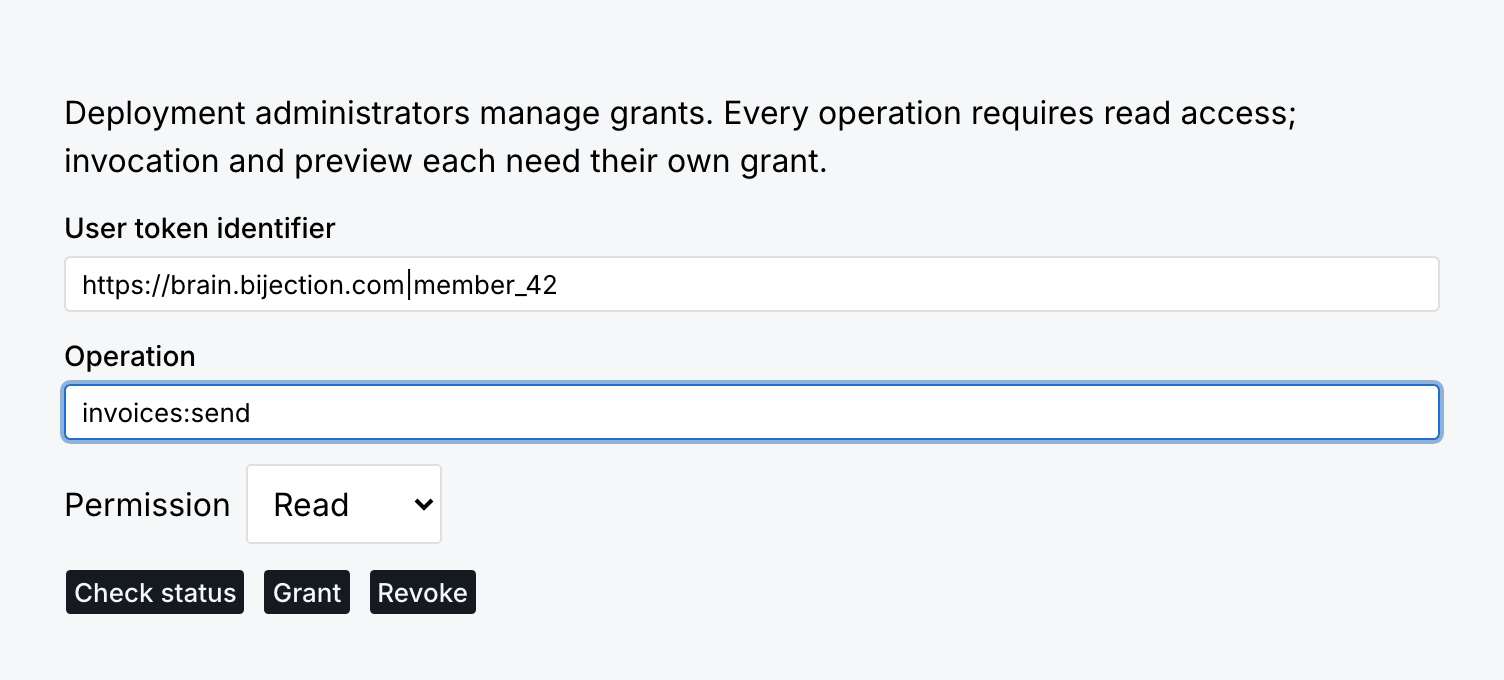 If an update's outcome is uncertain, choose **Check status** before retrying it.
## Use your application's staff provider
When staff already sign in through your application's OIDC provider, mark that
same public client for CLI and console sign-in:
```ts bijection/auth.config.ts theme={"theme":{"light":"github-light-default","dark":"github-dark-default"}}
import { staffIdentity } from "bijection/server";
export default {
providers: [staffIdentity({
domain: "https://sso.example.com/",
applicationID: "your-public-client-id",
consoleRedirectUris: [
"https://console.bijection.com/business-auth-callback",
],
scopes: ["openid", "profile", "email", "offline_access"],
})],
};
```
Select exactly one provider. Register authorization-code flow with PKCE S256,
the exact HTTPS console callback, and the native client's
`http://127.0.0.1:/business-auth-callback` loopback redirect.
The browser also needs the provider's discovery and token endpoints to allow
the console origin. No client secret belongs in this declaration or the CLI.
Use the same client as the app so providers using pairwise subjects do not
give the person a different subject. A provider that cannot support these
public-client flows cannot serve this sign-in path.
```sh theme={"theme":{"light":"github-light-default","dark":"github-dark-default"}}
bijection login business --deployment dev
bijection permissions status --me invoke --operation invoices:send
```
The console offers **Sign in to your staff provider**. Both clients verify the
returned token through the deployment and keep the exact issuer and subject
on renewal. A refused staff login never falls back to a management identity.
`--member` is a management-team lookup and is unavailable for this provider;
use `--me` or the exact staff token identifier instead.
If an update's outcome is uncertain, choose **Check status** before retrying it.
## Use your application's staff provider
When staff already sign in through your application's OIDC provider, mark that
same public client for CLI and console sign-in:
```ts bijection/auth.config.ts theme={"theme":{"light":"github-light-default","dark":"github-dark-default"}}
import { staffIdentity } from "bijection/server";
export default {
providers: [staffIdentity({
domain: "https://sso.example.com/",
applicationID: "your-public-client-id",
consoleRedirectUris: [
"https://console.bijection.com/business-auth-callback",
],
scopes: ["openid", "profile", "email", "offline_access"],
})],
};
```
Select exactly one provider. Register authorization-code flow with PKCE S256,
the exact HTTPS console callback, and the native client's
`http://127.0.0.1:/business-auth-callback` loopback redirect.
The browser also needs the provider's discovery and token endpoints to allow
the console origin. No client secret belongs in this declaration or the CLI.
Use the same client as the app so providers using pairwise subjects do not
give the person a different subject. A provider that cannot support these
public-client flows cannot serve this sign-in path.
```sh theme={"theme":{"light":"github-light-default","dark":"github-dark-default"}}
bijection login business --deployment dev
bijection permissions status --me invoke --operation invoices:send
```
The console offers **Sign in to your staff provider**. Both clients verify the
returned token through the deployment and keep the exact issuer and subject
on renewal. A refused staff login never falls back to a management identity.
`--member` is a management-team lookup and is unavailable for this provider;
use `--me` or the exact staff token identifier instead.
 ## Identity and lifetime
Management identities have a stable subject such as `member_42`. Rules see the
ordinary `ctx.auth.getUserIdentity()` and its `tokenIdentifier`, for example
`https://brain.bijection.com|member_42`. Email and name are display data, not
identity or authority. Email is included only after provider verification.
Applications that accept multiple identities for one person should use an
explicit, authorized association table; matching email addresses never links
accounts automatically.
Management tokens live at most five minutes and never outlive their originating
credential. Every issuance rechecks membership and access. Already issued tokens
verify offline until expiry; upstream revocation also depends on the identity
provider's propagation and the broker's bounded observation cache. Issuance
needs the management service, and new-key verification needs its public key
endpoint. Customer-provider lifetimes and refresh availability belong to that
provider.
The CLI refreshes its user token while following a request. Refresh preserves
the caller; it does not extend authority retained by accepted external work.
Use explicit [reauthorization](/operations/cli-and-dashboard#renewing-accepted-authority)
when that work needs fresh authority. CLI logout removes local identity caches;
console logout clears staff sessions in that tab. Neither revokes a token that
has already been issued.
Branches use the parent's user authentication and separate branch admission.
There is no branch token audience to configure. Automation and deployment keys
cannot exchange into a person's business identity.
## Identity and lifetime
Management identities have a stable subject such as `member_42`. Rules see the
ordinary `ctx.auth.getUserIdentity()` and its `tokenIdentifier`, for example
`https://brain.bijection.com|member_42`. Email and name are display data, not
identity or authority. Email is included only after provider verification.
Applications that accept multiple identities for one person should use an
explicit, authorized association table; matching email addresses never links
accounts automatically.
Management tokens live at most five minutes and never outlive their originating
credential. Every issuance rechecks membership and access. Already issued tokens
verify offline until expiry; upstream revocation also depends on the identity
provider's propagation and the broker's bounded observation cache. Issuance
needs the management service, and new-key verification needs its public key
endpoint. Customer-provider lifetimes and refresh availability belong to that
provider.
The CLI refreshes its user token while following a request. Refresh preserves
the caller; it does not extend authority retained by accepted external work.
Use explicit [reauthorization](/operations/cli-and-dashboard#renewing-accepted-authority)
when that work needs fresh authority. CLI logout removes local identity caches;
console logout clears staff sessions in that tab. Neither revokes a token that
has already been issued.
Branches use the parent's user authentication and separate branch admission.
There is no branch token audience to configure. Automation and deployment keys
cannot exchange into a person's business identity.