> ## Documentation Index
> Fetch the complete documentation index at: https://docs.bijection.com/llms.txt
> Use this file to discover all available pages before exploring further.
# Usage and Billing
> See what your AI Gateway requests cost and how Bijection bills them
The gateway records the project and function behind every request automatically.
You don't need to set anything up.
## Seeing your usage
The [team usage page](https://console.bijection.com) has an
AI Gateway section that shows daily spend per project. Open it from the AI
Gateway card on the usage summary.
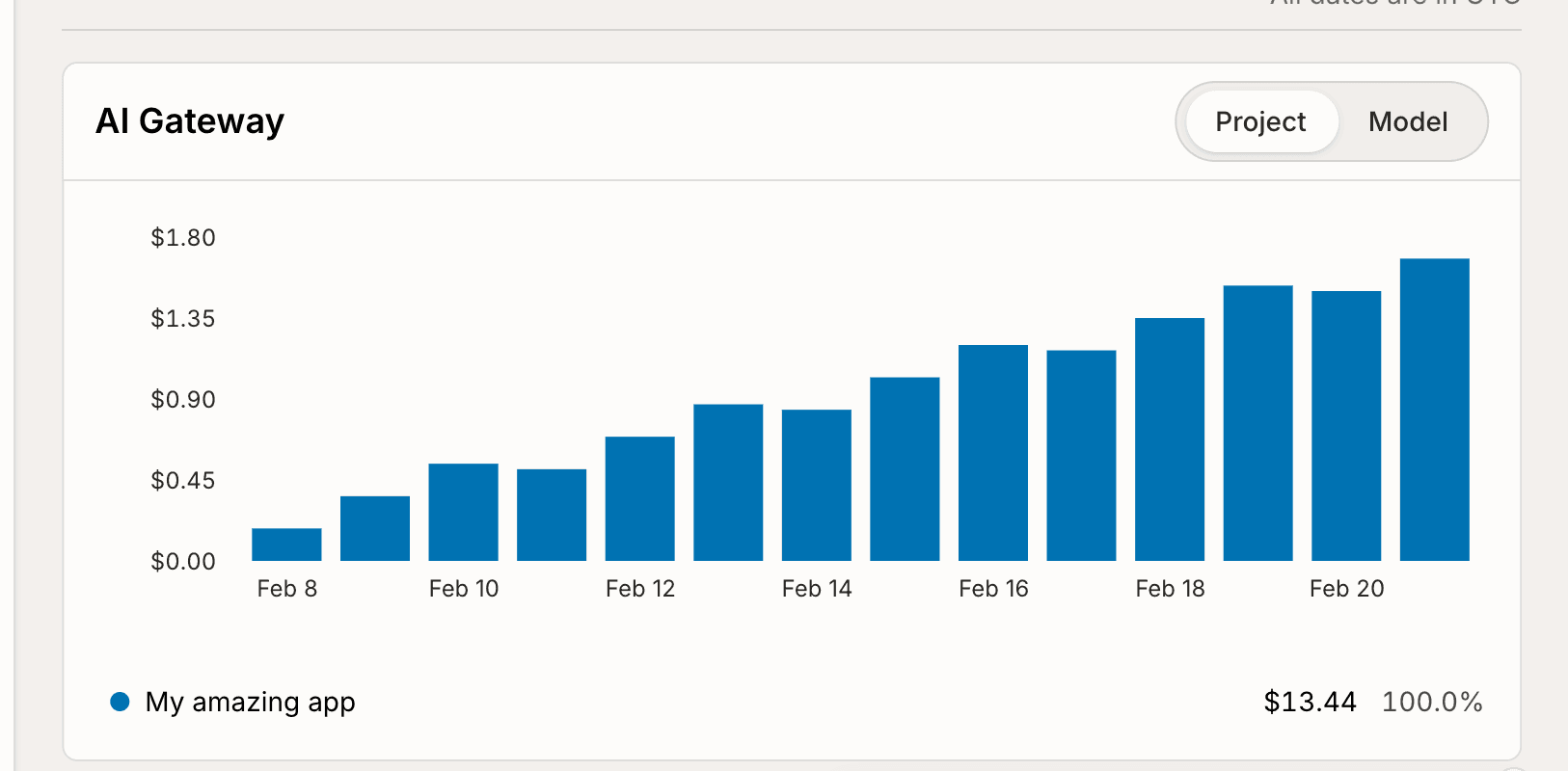 To see which functions spent the money, scroll to the breakdown by function and
pick the **AI** tab. It lists spend per function.
See the [usage page docs](/dashboard/teams/teams#usage) for the rest of the
page.
## Usage limits
Set daily or monthly AI Gateway limits for a cloud deployment from **Settings →
Usage Limits**. Choose the **AI Gateway** metric and set a disable threshold in
dollars. Production and preview deployments also support warning thresholds.
Reaching the disable threshold disables the whole deployment, not just AI
Gateway requests.
To see which functions spent the money, scroll to the breakdown by function and
pick the **AI** tab. It lists spend per function.
See the [usage page docs](/dashboard/teams/teams#usage) for the rest of the
page.
## Usage limits
Set daily or monthly AI Gateway limits for a cloud deployment from **Settings →
Usage Limits**. Choose the **AI Gateway** metric and set a disable threshold in
dollars. Production and preview deployments also support warning thresholds.
Reaching the disable threshold disables the whole deployment, not just AI
Gateway requests.
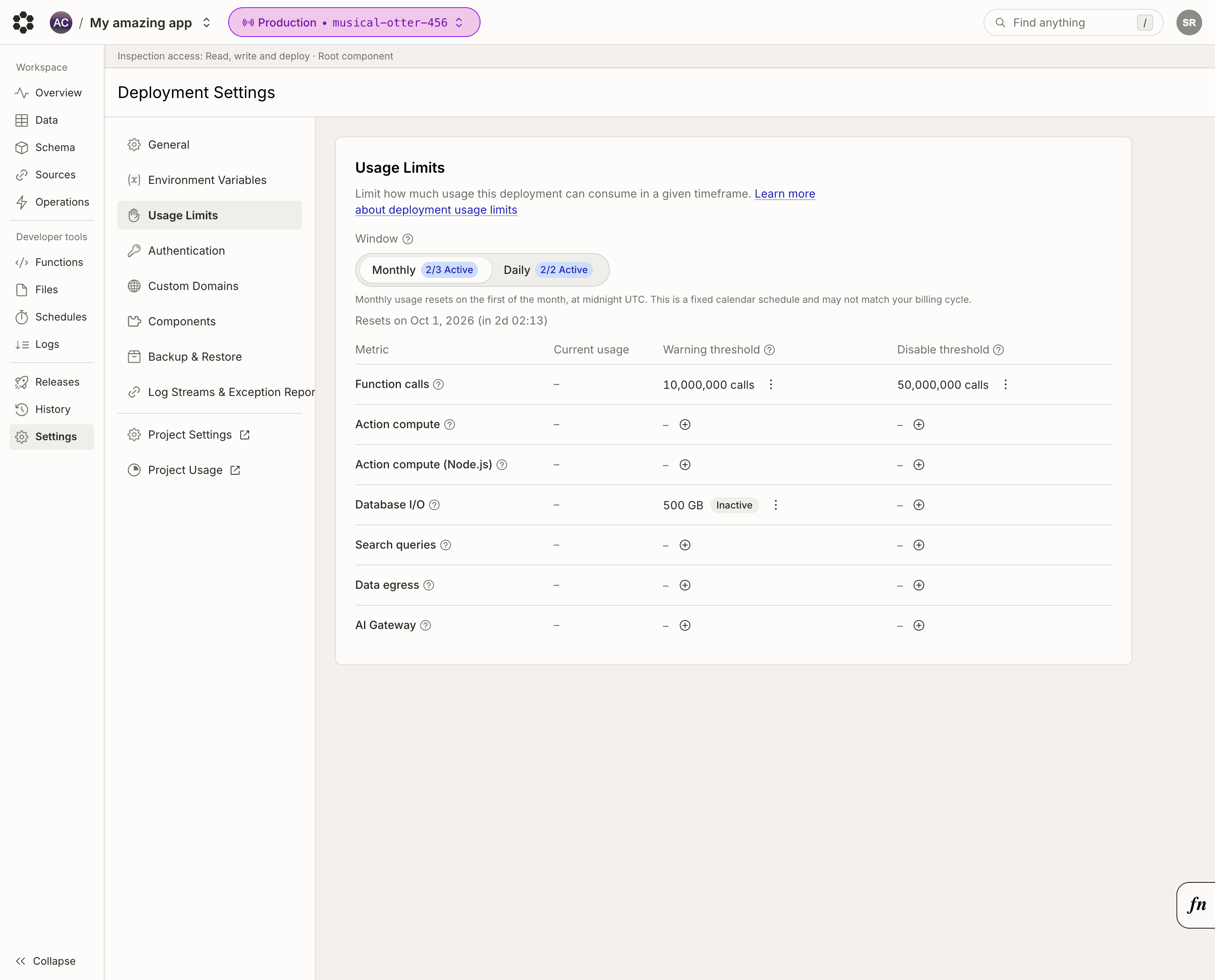 See [Usage limits](/production/usage-limits) for thresholds and reset
windows.
## How billing works
We charge the same rates as [OpenRouter](https://openrouter.ai/models). Price
per token depends on the model, when you use it, and whether the tokens are
cached. Image and video prices depend on the model and generation options, such
as resolution and duration. Cancelling a video request after submission can
still incur its generation cost. The charge appears as an AI Gateway line item
on your Bijection invoice, in dollars.
[Spending limits](/dashboard/teams/teams#spending-limits) apply to AI
Gateway spend like any other usage. Set a limit on the team billing page to cap
what your team pays per month.
Requests from a project-connected local deployment are attributed to that
project's team and count toward the same team spending limit. Local deployments
do not have a separate deployment-level live usage meter. Spending-limit state
is checked when the gateway credential is minted, so an in-flight request or an
already issued short-lived credential may finish after the limit is reached.
See [Usage limits](/production/usage-limits) for thresholds and reset
windows.
## How billing works
We charge the same rates as [OpenRouter](https://openrouter.ai/models). Price
per token depends on the model, when you use it, and whether the tokens are
cached. Image and video prices depend on the model and generation options, such
as resolution and duration. Cancelling a video request after submission can
still incur its generation cost. The charge appears as an AI Gateway line item
on your Bijection invoice, in dollars.
[Spending limits](/dashboard/teams/teams#spending-limits) apply to AI
Gateway spend like any other usage. Set a limit on the team billing page to cap
what your team pays per month.
Requests from a project-connected local deployment are attributed to that
project's team and count toward the same team spending limit. Local deployments
do not have a separate deployment-level live usage meter. Spending-limit state
is checked when the gateway credential is minted, so an in-flight request or an
already issued short-lived credential may finish after the limit is reached.